The Attila4MC environment is well-suited to modify and reuse problems for a variety of purposes. The modular nature of the problem package allows the user to use an established working problem and modify it with a new geometry, mesh, materials, source, or tally. Depending on the modifications made, the user may be required to re-mesh the geometry, assign the materials to regions, or change other parameters within the input file to complete the problem. In Example 9.3, the problem was a gamma shielding exercise. If, for example, we wanted to reassess the dose to the soldiers with the same geometry for a neutron source, we can modify the input file from a gamma problem with a cobalt source and photon tallies to a neutron problem without having to generate a new problem from scratch.
The gamma source used in Example 9.3 was downloaded from the example problem posted to the Attila user’s website. In Example 9.4, we will generate a neutron source using a Californium spectrum. The Californium-252 source which has a spontaneous fission rate like a Watt Spectrum. If we were modeling in MCNP, we could specify a Watt Spectrum for our ERG distribution and apply the appropriate coefficients from Appendix D in the MCNP manual for a Californium source.
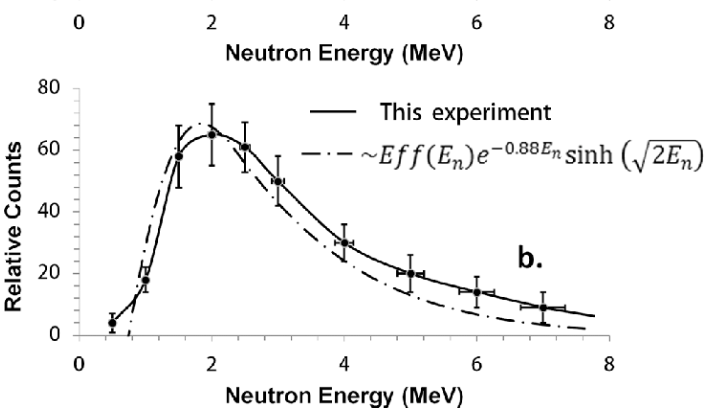
For Example 9.4, we are going to create a distribution to model the probability to gain practice with creating the source. The Cf-252 spectrum is well-approximated by the equation presented in numerous references to include the one presented in Figure 9.7.
Example 9.4
Create a Cf-252 fission-neutron source for Attila4MC using the equation presented in Figure 9.7, modify the problem for a neutron source and run the problem.
Solution: Begin by using a spreadsheet to create several energy bins from 0.1 - 9 MeV. Use the equation from Figure 9.7 to generate the raw (unnormalized) values across the energy spectrum.
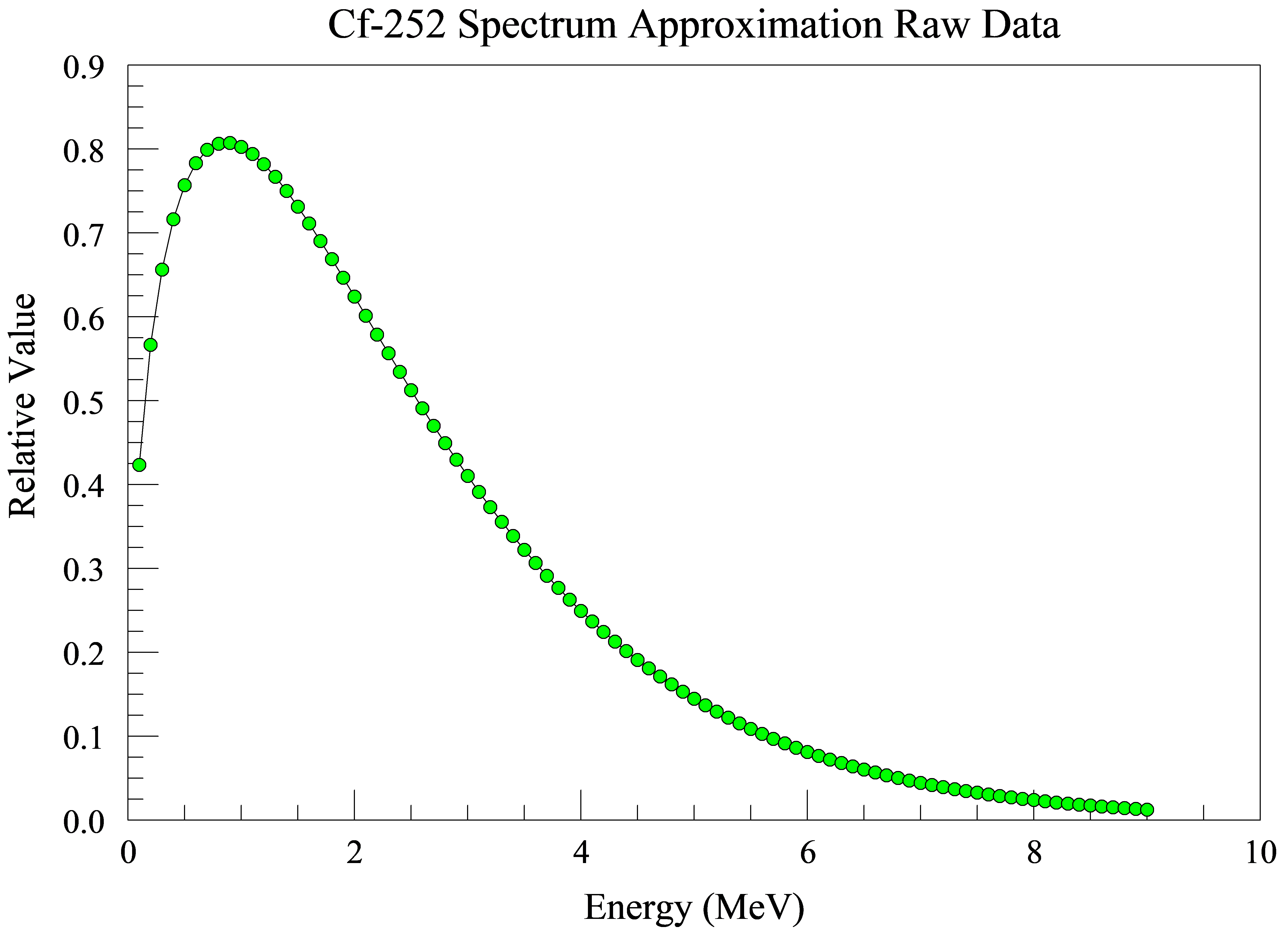
The values need to be normalized to get a cumulative probability of 1. MCNP will normalize a distribution set so the user can simply include the raw data, however we can divide each of the raw energy values by the sum of the set in the spreadsheet to get a normalized distribution.
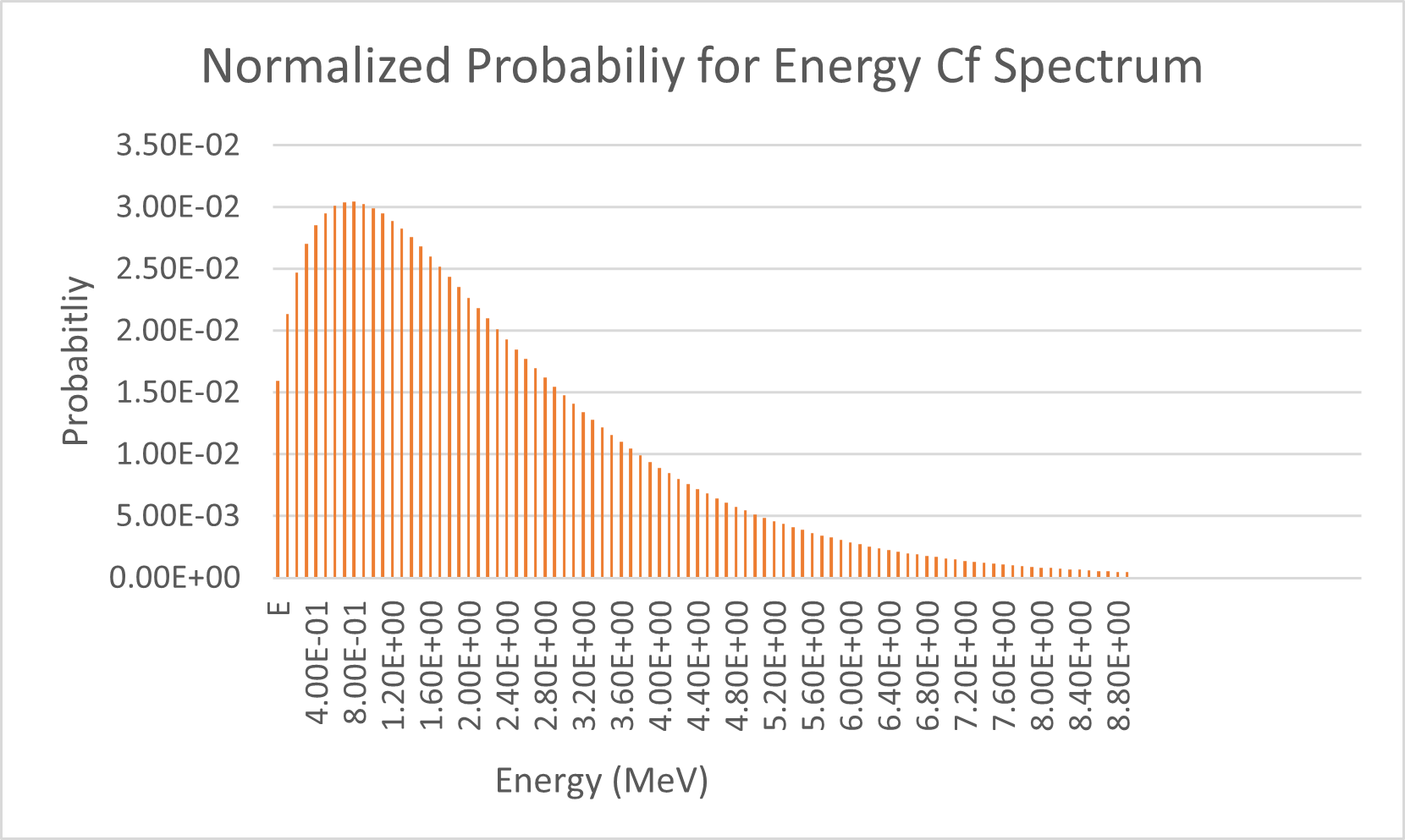
If we plot the normalized distribution as a bar chart, this represents the line distribution we would use in an MCNP SDEF similar to the point isotropic source with various discrete energies example on page 122. We could write an MCNP SDEF with the SI equal to the energies and the SP equal to the associated normalized probabilities from our normalized distribution. However, we will use Attila to create the source file for use in our problem.
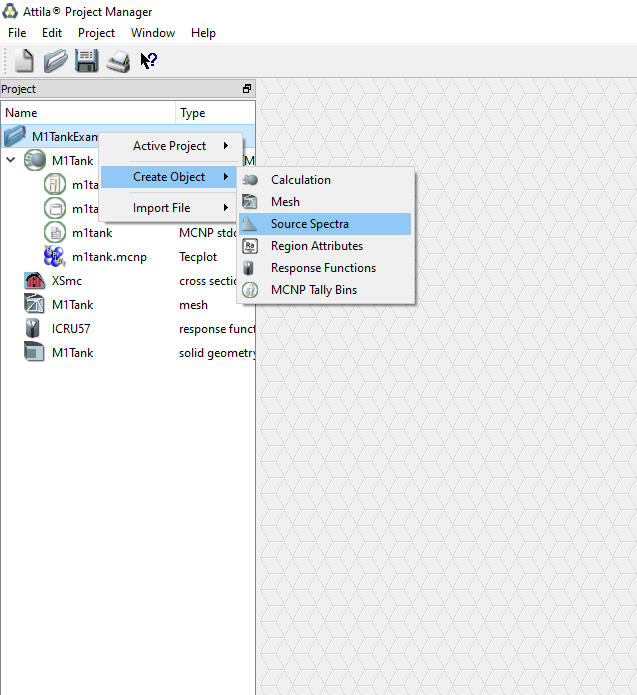
We can open our gamma source program from Example 9.3 and modify it with the new source data we generated in the spreadsheet. Because we will be using the same geometry, we can modify our gamma problem with a neutron source and change the MCNP controls and the tallies to neutrons. Note that this will overwrite our gamma problem files so we should copy them to another directory if we need them. To change our source, we will first right-click on the gamma source in our tree and remove it from the project. To create a new source spectra, right-click on the project name and select Create Object and Source Spectra.
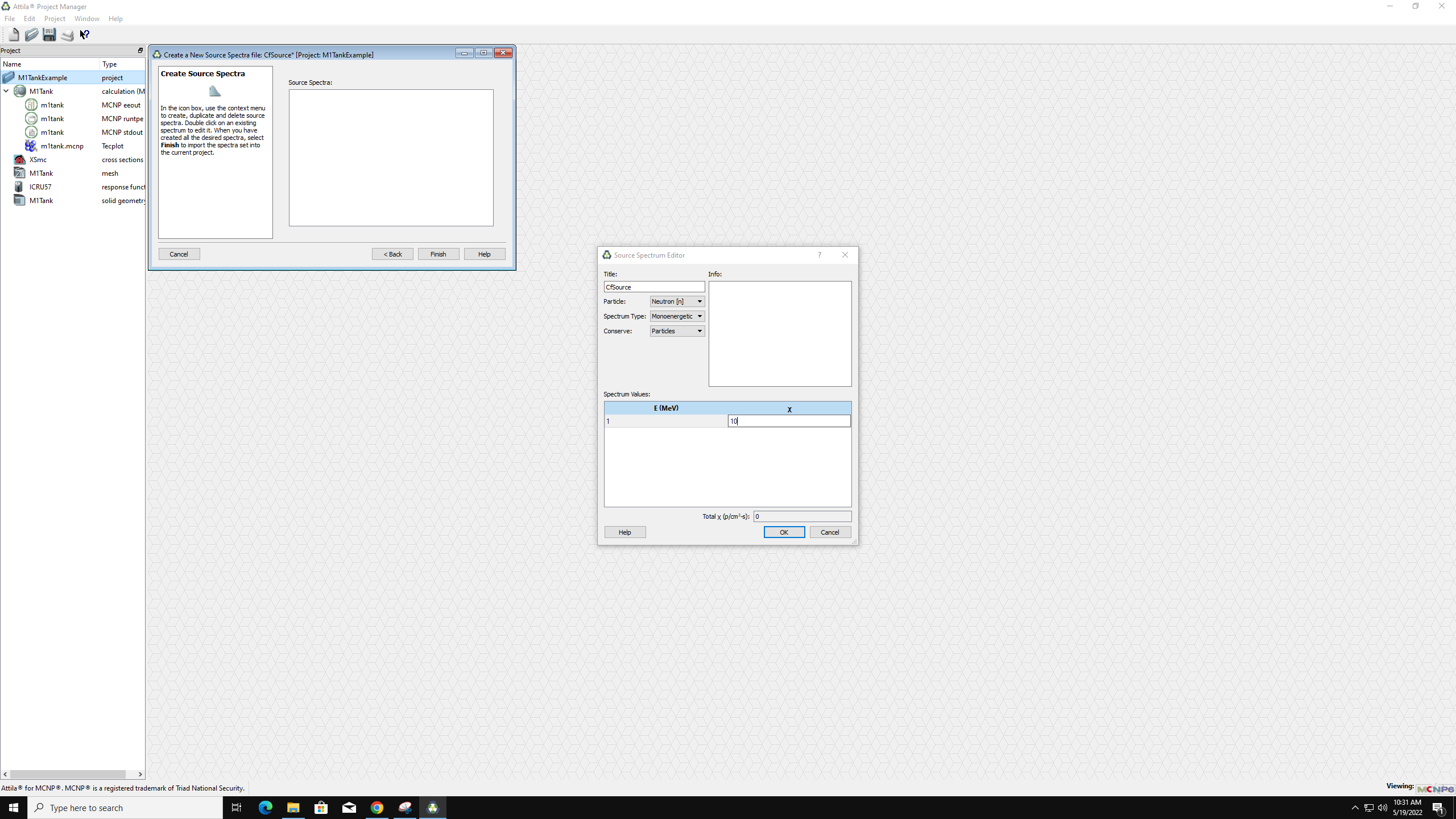
When the wizard opens, we will give the spectrum a name “CfSource” and select Next then right-click in the “Source Spectra” box and select Add Source Spectrum. In the window that pops up add a title, choose neutron for particles and change spectrum from Constant to Monoenergetic. Right-click in the area for Spectrum Values and select Add. Enter in one value for energy and probability just as a place-holder. This does not have to be a real energy or probability from our distribution and select OK and Finish.
The source spectra we created will now show up in the project tree for our problem. We will right-click on that item in the tree and select Export and place the file in the location where with the rest of the files for our new problem. Open the file using TextPad and you will see the two place holder numbers for the energy and the probability. Replace the place holders with the all the energy and normalized probability values and save the file. Now go back to Attila and right-click on tree and import the Source spectra file we just put in and replace the current file in the problem tree. We can right-click on the file in the tree and select edit to view and make sure the entire spectrum is present.
radion_spectra
title "CfSource"
info " "
version "1.0.0"
created "2022-05-19T10:36:52"
last_modified "2022-05-19T10:36:52"
discrete neutron "CfSource" conserve_particles
info " "
1 10
end_discrete
end_radion_spectraradion_spectra
title "CfSource"
info " "
version "1.0.0"
created "2022-05-19T10:36:52"
last_modified "2022-05-19T10:36:52"
discrete neutron "CfSource" conserve_particles
info " "
1.00E-01 5.24E-01
2.00E-01 7.02E-01
3.00E-01 8.13E-01
4.00E-01 8.88E-01
5.00E-01 9.38E-01
6.00E-01 9.70E-01
7.00E-01 9.90E-01
8.00E-01 9.99E-01
9.00E-01 1.00E+00
1.00E+00 9.94E-01
1.10E+00 9.84E-01
1.20E+00 9.69E-01
1.30E+00 9.50E-01
1.40E+00 9.29E-01
1.50E+00 9.06E-01
1.60E+00 8.81E-01
1.70E+00 8.55E-01
1.80E+00 8.28E-01
1.90E+00 8.01E-01
2.00E+00 7.73E-01
2.10E+00 7.45E-01
2.20E+00 7.17E-01
2.30E+00 6.89E-01
2.40E+00 6.62E-01
2.50E+00 6.35E-01
2.60E+00 6.08E-01
2.70E+00 5.82E-01
2.80E+00 5.57E-01
2.90E+00 5.32E-01
3.00E+00 5.08E-01
3.10E+00 4.85E-01
3.20E+00 4.62E-01
3.30E+00 4.41E-01
3.40E+00 4.20E-01
3.50E+00 3.99E-01
3.60E+00 3.80E-01
3.70E+00 3.61E-01
3.80E+00 3.43E-01
3.90E+00 3.26E-01
4.00E+00 3.09E-01
4.10E+00 2.93E-01
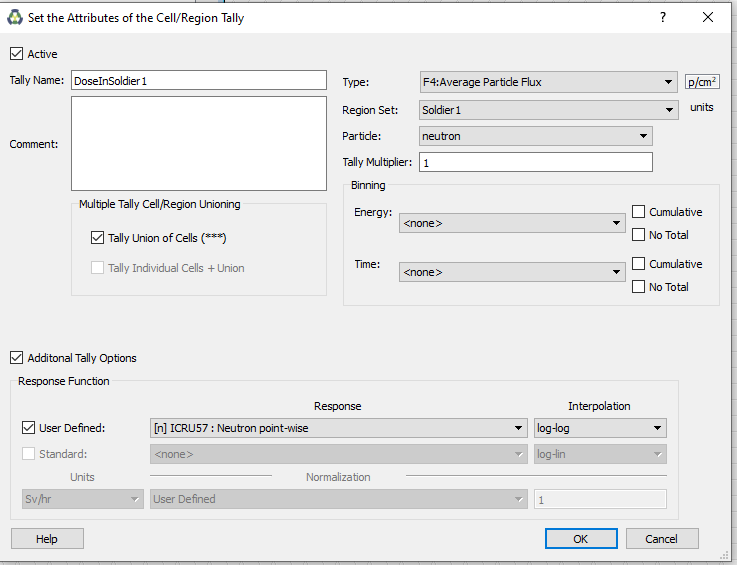
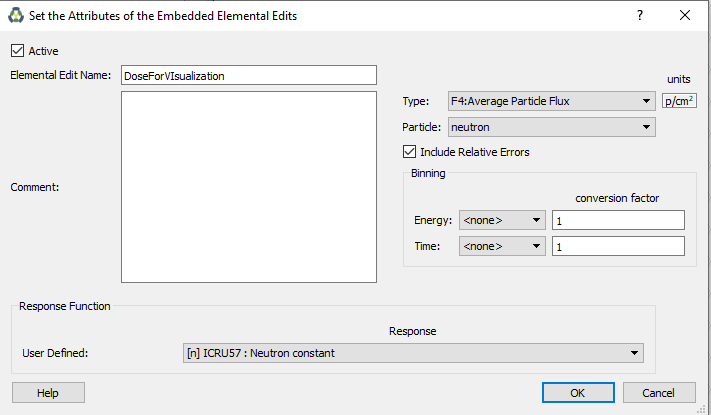
4.20E+00 2.78E-01Once the source is changed to a neutron, we need to edit the Calculation. Right-click on the calculation in the project tree and select edit. Choose MCNP Controls and change the particle type to Neutrons. Go to the Fixed Source window and double-click on the Spectrum and select the CfSource. The final step involves changing the tallies and elemental edits. Go to the Custom Reports and change each of the MCNP tallies and elemental edits to neutrons with a response function of IRCU57 Neutron.
Save the project and then select “Run MCNP” to execute as a neutron source problem.
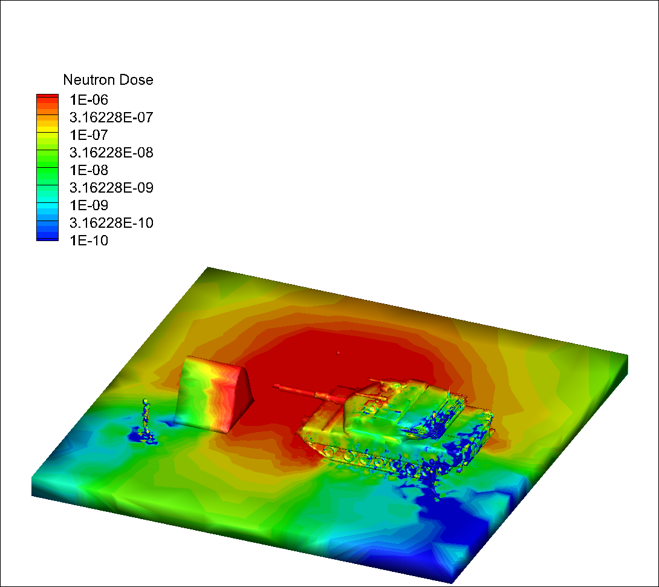
Just as it is possible to reuse a problem with a different source, a problem can be reused with a different geometry. For example, we could modify our Parasolid in Example 9.3 by adding a mound of dirt in front of the tank and shielding the person out in the open as shown in Figure 9.8.
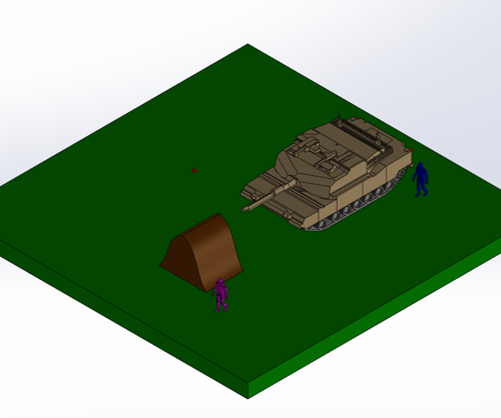
To do so, we would first create a part in Solidworks for the berm. We would then open the assembly we created for our tank model and add the berm and save as a new Parasolid. Once the new Parasolid is created, we can modify our model in a similar way we did when we changed the source. In this case, because the geometry is different, we will copy the project file, source spectra, and the cross-section files into a new subdirectory. Once complete, copy the new Parasolid into the same subdirectory. Open the project and modify it by importing the new Parasolid, generating the mesh, and importing it into our model. We then can edit the calculation to include associating the new mesh geometry, assigning the region attributes, and modifying any associated regions for the source and tallies as needed. By updating models, we can build a material library and streamline our calculation setup process. Caution - the associated cross-sections used to create those materials must be copied and remain the same to reuse materials in subsequent calculations.
References
Full bibliography- Becchetti Jr, Frederick & Febbraro, M. . T.-I. R. . O. M. . B. L. (2013). Cf-252 fission-neutron spectrum using a simplified time-of-flight setup: An advanced teaching laboratory experiment, American Journal of Physics 81: 112–119. https://doi.org/10.1119/1.4769032