On this page
The MCNP input file is written in a free field format in a text editor. Free format indicates that, after the card name, the number of spaces between entries is not fixed. This text uses TextPad® as the text editor of choice because some of its advanced features, such as block select mode and macros are not available on some other text editors, like Notepad®. You should never use a word processor to try and write the input for MCNP. A word processor, like Microsoft Word®, will put unseen formatting characters in the input file that will cause the code to fail. Even within a plain text editor, you have to be careful to not use characters other than numbers and letters, returns and spaces. You cannot use the tab key for an MCNP input file.
The input file is broken into the mandatory structure presented in Table 5.1. If you do not follow the structure exactly, the input will fail to execute. The blank lines act as deliminators and are necessary and you can only have one wherever specified. This is unlike SCALE and Julia which will allow for multiple blank lines in the input. The deliminators tell the code to look for the next section (i.e. surface cards or data cards). If you include an additional blank line the code will terminate the reading of the input file early and provide an error that may not make sense to the user such as "no material card present." This can be frustrating to the user who knows there is a material card in the input and does not recognize that the second blank line indicates to MCNP the data card block has started and any input past a third blank line is not read. The order for the blocks is also important. For example, you cannot put the surface cards in the cell card block.
Table 5.1. MCNP Input File Structure.
| Description | Comments |
|---|---|
Problem Title Card | This title is printed in the output |
Cell Cards | |
| One blank line deliminator | |
Surface Cards | |
| One blank line deliminator | |
Data Cards | |
| One blank line terminator (optional) |
In addition to the restrictions on the blank lines, the input for MCNP is limited to a maximum line length of 80 characters. This is because the code was designed to be used with the 80-column punch card introduced by IBM in 1928. (IBM; 2016) To ensure you do not exceed 80 characters in TextPad®, look at the lower right corner of the window and you will see two white numbers that change whenever you move the cursor through the file. The first is the row number and the second is the column number. Also the first 5 characters in the line are reserved for the card name for the input command. If a line of input text has to be longer than 80 characters, it can continue to the next line as long as there are 5 spaces in the first 5 columns. For example, the following material card has input that wraps onto two lines:
M2    92235.70C  -4.10779E+00   92238.70C     -8.40421623E+01
     8016.70C   -1.18500E+01 $UO2 4.66% EN at 293K
As we outlined in the procedure for writing Julia scripts, it is important to include meaningful comments within the input file for an MCNP file. Like how in Julia the number or hashtag (#) symbol and in SCALE the apostrophe (') indicate comments, the letter c (upper or lowercase) followed by a space to lead a line indicates a comment in MCNP. Also, the dollar sign ($) in an input line indicates that everything that follows is a comment. Note, you must have a space after the letter c or MCNP will think that the comment is a card name.
In general, an input line in MCNP will consist of the card name, mnemonic, in the first 5 columns followed by parameters associated with that card, known as cell entries. The entries are normally numerical. The standard units used in MCNP are listed in Table 5.2.
Table 5.2. Standard Units in MCNP
| Measurement | Unit |
|---|---|
| Length | cm |
| Energy | MeV |
| Time | shakes (10 s) |
| Temperature | MeV (kT) |
| Mass density | g/cm |
| Cross section | barns (10 cm) |
Building the Input Deck– Define Materials
While at first it may seem to make sense to begin by starting at the top of the input deck format described in Table 5.1, it is not possible. To fully describe each of the cells in the geometry, you first must know the materials and the surfaces that make up those cells. As a technique, we will start our MCNP input deck by defining the materials first.
The material card is one of the cards in the Data Cards section of the input. Each material card represents a unique substance in the model geometry. Once defined, that material can be used in multiple portions of the model. The density of the material is defined in the cell card. Therefore, the only time you would have to redefine a material with a given isotopic composition is if it is used at different temperatures in the same model. Materials are defined by the isotopes that make them up in either their atom percent or weight percent. The identification for the isotope is the ZAID number, as was used in SCALE, followed by the cross-section library identification. The complete list of isotopes and libraries that are part of the MCNP code suite can be found in APPENDIX G – MCNP Data Libraries in the MCNP User’s Manual. (Team; 2008) An example for hydrogen neutron cross sections from APPENDIX G is presented in Figure 5.3 from the MCNP5 manual.
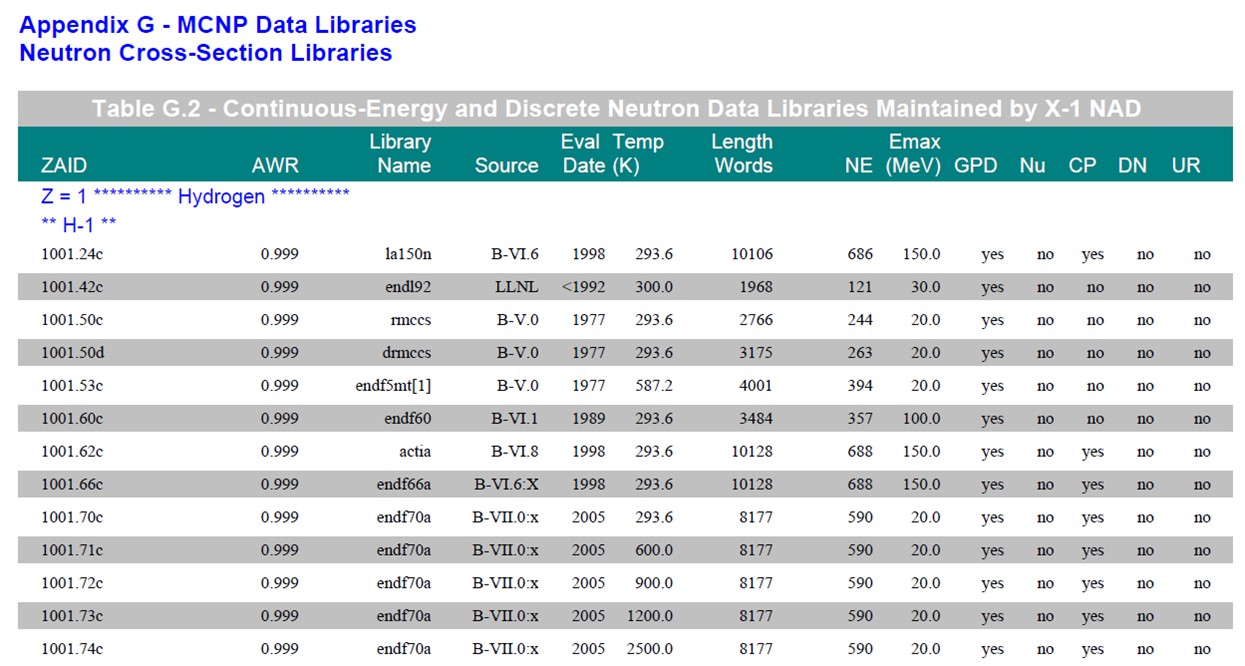
Note from the example in Figure 5.3, the ZAID has not only the atomic number (Z) and the mass number (A) but also a decimal followed by an extension consisting of a two-digit number and a letter. This extension specifies the neutron cross section library to be used. The cross-section libraries in MCNP include charged particles, discrete energy, and continuous energy neutron libraries to name a few. In general, we will only be using the continuous energy neutron libraries which are annotated with a “C” at the end of their ZAID. The two numbers indicate the specific Evaluated Data File the user wants to use. In general, the user should specify the newest data file available (ENDF 7) because it has the most current measurements. It is also very important to specify the library that corresponds to the temperature for the material in the model. For ENDF7, the *.70c library is at room temperature while the *.71c, *.72c, *.73c, and *.74c libraries are at 600, 900, 1200 and 2500 kelvin respectively. If the user needs more specific temperatures, they can use NJOY99 to create cross sections at other temperatures and add them to the MCNP library. The custom creation of cross-sections is not covered in this text. If the cross-section library extension is not added to the material ZAID, MCNP will pick the most recent cross section by default. Because the temperature effect on some cross sections can be important, it is better to specify the library being used when performing neutron calculations. It is ok to specify the neutron cross section library for a photon-only problem. MCNP will just give a warning and ignore the neutron table.
When specifying a material, write the designation “M” followed by a unique number for that material (i.e. M1) in the first 5 columns of the line followed by the ZAID for each isotope, and the atom fraction or mass fraction for that isotope. For example:
M1 8016.70C 1 1001.70C 2 $ room temp water by atom fractionThis line represents material 1 in the atomic fraction of HO.
M1    8016.70C  -8.88100E+01
     1001.60C  -1.11900E+01 $ room temp water by mass fraction
This line represents material 1 in the mass fraction of HO. Materials do not have to be numbered in order within the input deck. They just require a unique number identifier. Notice how the negative sign before the fraction denotes mass versus atom fraction in the compound. Before we move on to another material example, it is important to discuss the treatment of water, especially in thermal reactors. Hydrogen when bound in water has different scattering cross sections than the free gas model of hydrogen and oxygen in the ratio of water presented in the previous example. It is important to add a special treatment card (MT) to the input that accounts for the scattering of hydrogen in water. APPENDIX G has a tabular list of all of the .XXt cross section libraries that account for the scatter of neutrons off of water and other important compounds that have unique binding effects. A correct input example for water at room temperature for neutrons would be:
M1    8016.70C 1 1001.70C 2  $ room temp water by atom fraction
MT1   lwtr.10t $ light water at room temperature
The number 1 following MT indicates that the treatment is applied to material 1. Another example of an input is the one we presented earlier for UO:
M2    92235.70C  -4.10779E+00   92238.70C     -8.40421623E+01
     8016.70C   -1.18500E+01 $UO2 4.66% EN at 293K
If the mass fractions for all the isotopes in a given material do not add up to 1.0, MCNP will normalize the input. If you know the isotopic concentration, atom or mass fractions of each, and the density of the material, you can model anything. Often the challenge is finding out what isotopes are in a particular material.
There is an excellent reference published by the Pacific Northwest National Laboratory called Compendium of Material Composition Data for Radiation Transport Modeling. (Detwiler et al.; 2021) It is publicly available at: PNL Compendium This reference has the isotopic compositions for thousands of materials. For example, it contains references for materials like concrete, different rubber compounds, plastics, and wood. The isotopic concentrations are listed with their ZAID numbers and the atom fractions, weight fractions and atom densities. The reference also provides the physical density of the material which will be needed in the cell description.

References
Full bibliography- Detwiler, R. S., McConn, R. J., Grimes, T. F., Upton, S. A. and Engel, E. J. (2021). Compendium of Material Composition Data for Radiation Transport Modeling. https://doi.org/10.2172/1782721
- IBM (2016). Image of puchcards. URL: https://www.ibm.com/history/punched-card
- Team, X.-. M. C. (2008). MCNP - A General Monte Carlo N-Particle Transport Code, Version 5, Los Alamos National Security, LLC, Los Alamos, NM. https://mcnp.lanl.gov/pdf_files/TechReport_2003_LANL_LA-UR-03-1987Revised212008_SweezyBoothEtAl.pdf