OWEN
Open Workspace for Engineered Neutronics
VS Code Extension for Nuclear Monte Carlo
Write, check, convert, and run MCNP, OpenMC, Serpent, and SCONE decks in the editor you already use. Diagnostics as you type, a 3D preview of the real geometry, converters between the four codes, and a results viewer — fully offline.
MCNP workspace validation
Set a project root — validate cells, surfaces, materials, and universes across read/copy includes; undefined refs and duplicate IDs surface in Problems
Input Builder wizards
Material, surface, cell, lattice, source, and settings snippet wizards with validation preview — Ctrl+Shift+I
Cross-code converter
MCNP↔OpenMC stable, MCNP→Serpent/SCONE experimental — Rosetta diff webview, TODO markers for gaps
OpenMC render & verify
Native slice plots, overlap and lost-particle checks — validate converted geometry before you run
Results viewer & sweeps
k-eff convergence, flux spectra, tally tables, mesh heatmaps; parametric sweep dashboard over run dirs
PNNL-15870 materials
411-material compendium — search by name or ZAID, insert per-code cards from the command palette
Monte Carlo language server
Real-time diagnostics, hover, go-to-definition, find-references, and document symbols for MCNP/Serpent/SCONE
Syntax highlighting
Five palettes for MCNP, OpenMC, Serpent, SCONE, and PHITS — switch live from the command palette
MCNP reference tracker
Role-aware Go-to-Definition (F12), Find References (Shift+F12), hover tooltips, lattice fill-array decoder dock
Snippets
Ready-to-edit pin cell, assembly, criticality, and shielding decks for all four codes
Input validation
Deep per-language checks: density sign, fraction sign, ZAID suffixes, S(α,β) table matching its target, macrobody counts
Simulation runner
Launch MCNP, OpenMC, Serpent, or SCONE in a dedicated terminal without leaving the editor
Parametric sweeps
JSON-configured parameter sweeps with per-run mutation, k-eff capture, and TSV summary
Lattice tab (Input Builder)
Integrated visual grid editor inside Input Builder — paint pin types, W 17×17 / BWR presets, emits MCNP / OpenMC / Serpent / SCONE
Prebuilt Models
Bundled BEAVRS full-core (193 assemblies) and 17×17 assembly starters for all four codes
NRDP material insert
Command-palette search by name or ZAID, insert ready-to-use material cards
Community Library
Browse and insert approved ReactorMC models — on by default; disable with owen.community.enabled
ReactorMC search panel
Search tutorials and NRDP from the command palette — results stay in-editor; open reactormc.net only when you need the full page
Highlight palette picker
Switch between four color palettes per language without restarting — applied live
3D geometry preview
Full BEAVRS core, layer toggles, slice planes. Scroll zooms toward what you point at — it no longer leaps onto a single pin.
ALLEN Doppler Studio
Built-in σ(E) webview from ENDF/B-VIII.0 — multi-temperature overlay, resonance integral, self-shielding
What's new in v1.4.8
Zoom on a full core used to leap. The old control zoomed toward the centre of the whole reactor. On a pin cell that is a few centimetres away, so each scroll notch felt fine. On a BEAVRS core the centre is metres past the first pin, so one notch jumped from the vessel onto a single fuel pin — or inside the fuel, which went black. Scroll now zooms toward whatever you point at, in the same small steps a pin cell always had. Drag to orbit is unchanged. If the 3D view loses the GPU, it rebuilds instead of staying black. Grid spacers now show on MCNP, Serpent, and SCONE, not just OpenMC.
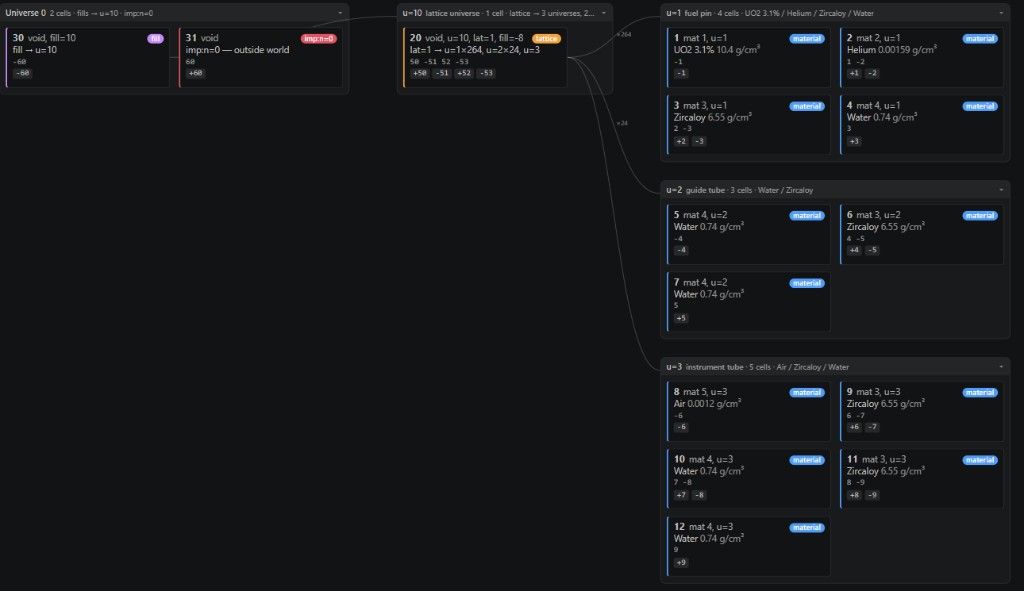
Cell Map walks a lattice the way the code will: root universe, the fill, and the pin / guide-tube / instrument-tube universes it places. Click a card to jump to that card in the file.
v1.4.8 • VS Code & Cursor
A BelvoirDynamics Product | ReactorMC
Install OWEN v1.4.8
Install from the VS Code Marketplace in VS Code, or from Open VSX in Cursor and VSCodium — Cursor users should use the Open VSX link. The GitHub VSIX is v1.4.8; Marketplace and Open VSX are still v1.4.6until a publish lands. Use the GitHub button for gradual 3D zoom on a full core, GPU-loss recovery, and grid spacers on every code.
Or install from the command line:
code --install-extension belvoirdynamics.owen-neutronicsOr via the Command Palette (Quick Open):
ext install belvoirdynamics.owen-neutronicsIf Cursor or VS Code asks whether you trust the authors of the files in this folder when you enable OWEN, that is workspace trust for the folder you opened — not a Marketplace warning that the extension is unsafe. Click Trust Workspace & Install. Syntax highlighting still works in Restricted Mode; running a code or Render with OpenMC needs the folder trusted, because those commands execute the decks in it.
Key settings
owen.mcnp.executable— path tomcnp6for the run command.owen.openmc.pythonExecutable— Python interpreter for OpenMC model scripts.owen.serpent.executable— path to the Serpent 2 binary (sss2).owen.scone.executable— path to the SCONE binary (WSL on Windows).owen.mcnp.projectRoot— absolute path to the MCNP project root for cross-file workspace validation.owen.mcnp.workspaceValidation.enabled— run project-wide MCNP validation when a root is set (default on).owen.mcnp.workspaceValidation.warnUnused— emit unused-definition hints project-wide (default off).owen.mcnp.dialect— which MCNP version's card-image column limit to enforce:mcnp6.1-and-earlier(80, the portable default),mcnp6.2+(128), orcustom. Toggle from the status bar or OWEN: Toggle MCNP Line Limit (80/128); ac owen: line-limit=128comment near the top of a file overrides the setting per-deck. Comment cards and$tails that start before the limit are not underlined: truncating them does not change the problem.owen.mcnp.lineLengthLimit— raw column limit used when the dialect iscustom(default 80).owen.preview.maxInstances— 3D preview instance budget (default 1,500,000; raise for full BEAVRS at max fidelity).owen.community.enabled— browse the ReactorMC Community Library in-editor (on by default; turn off to stop contacting the backend).owen.nrdp.live— live-fetch NRDP material snapshots when online.owen.allen.dataBaseUrl— base URL for ALLEN cross-section JSON (override for offline use).
Looking for the desktop app? Visit /groves.
Cross-code deck converter
Port decks between MCNP, OpenMC, Serpent, and SCONE
Run OWEN: Convert Deck… from the Command Palette, pick source and target code, and review the output in a Rosetta diff webview. MCNP↔OpenMC is stable(BEAVRS-validated); MCNP→Serpent and MCNP→SCONE remain experimental. Unconvertible constructs are never silently dropped — they carry TODO(owen-convert) markers with a reason.
After converting, use Render with OpenMC or Verify Geometry with OpenMC to confirm the model before production runs.
Full converter guide — limitations, workflow, examplesRoadmap
What's next
OWEN is a stable release for MCNP, OpenMC, Serpent, and SCONE: diagnostics, 3D preview, converters (MCNP↔OpenMC production-stable), results, and materials. Here is where it is headed.
Converter breadth
MCNP↔OpenMC stable already handles BEAVRS-scale geometry. Next: broader tally and source coverage, richer Serpent/SCONE targets, and tighter round-trip guarantees on assembly decks.
Language server
Cross-file validation and Input Builder already ship. Next: richer completions across include files and shared material libraries.
Broader geometry coverage
The exact geometry engine and in-editor 2D slice already ship. Next: mixed-quadric mesh booleans and closer parity with OpenMC's own plotter.
Validation depth
Undefined refs and duplicate IDs across MCNP includes already ship. Next: workspace-level ZAID audits and Serpent/SCONE cross-file checks.
Community models — live in v1.4.8
Search approved ReactorMC decks from the Command Palette and insert them into the editor. Upload, rate, and comment stay on this Community Library page — OWEN opens it in a browser for that path. Disable with owen.community.enabled if you want a fully offline install.
Need a fully-offline editor for air-gapped work? GROVES desktop returns as v2.0.0 by Christmas 2026.